Strings
by Gaurav Gupta
- Strings
- Practice problems
- Length of a String
- Characters in a String
- Looping through a String
- Adding a String to ANYTHING
- Checking if two Strings are identical
- substring
- Some cute tricks
- Examples
- Useful functions
- Extra resources
Assumed Knowledge:
Learning Outcomes:
- Understand how to operate on String data type
Strings
Strings are nothing but a character array (char[]) inside a parcel known as class. It has built-in functions operating on variables (actually objects) of the String type (actually class).
Practice problems
The problems at codingbat are very helpful in understanding and applying the concepts as you go!
- https://codingbat.com/home/gaurav.gupta@mq.edu.au/strings
- https://codingbat.com/java/String-1
- https://codingbat.com/java/String-2
So, keep those open in a second tab and solve them as you go through the following.
Declaration and initialization
1
2
3
4
5
6
7
String str;
println(str); // COMPILATION ERROR - The local variable "str" may not have been initialized

str = "Kill Bill";
println(str); // displays Kill Bill

String second = "Super Nintendo Chalmers"; // declaring and initializing in one statement
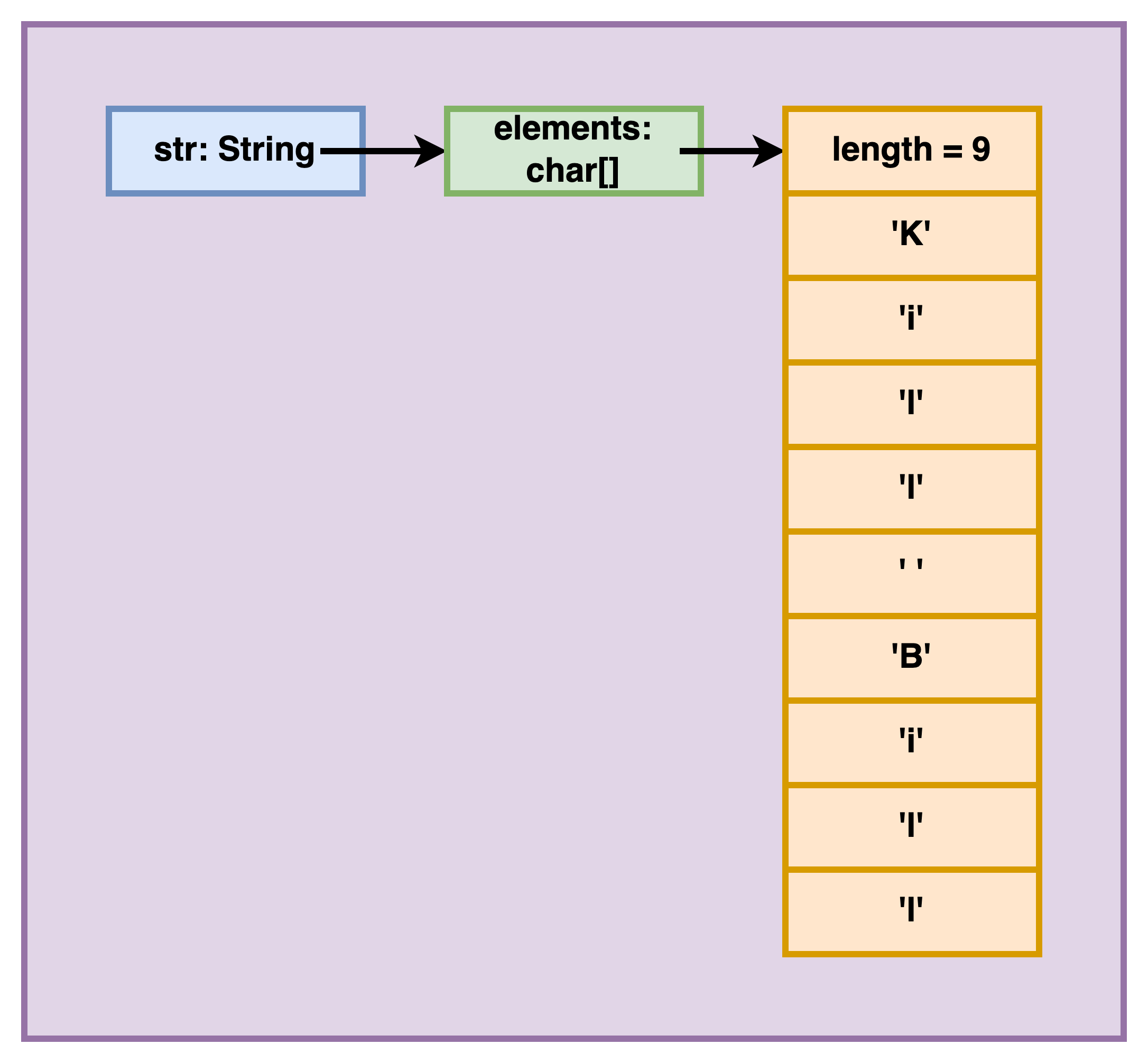
The memory diagram for the first object is provided below. The variable str is a String reference to the String instance that holds a char[] reference (named elements) which refers to a char[] instance holding the actual items (and the length attribute).
Length of a String
Length (number of characters) of a String str is given by str.length().
!!! Note the brackets at the end of length, unlike with an array’s length !!!
(And yes, we all hate Java for that!)
Characters in a String
- First character is at index 0 and accessed using
str.charAt(0). - Last character is at index
str.length()-1and accessed usingstr.charAt(str.length()-1). - In general, character at index
iis accessed usingstr.charAt(i).- where
ican be from 0 tostr.length()-1.
- where
Looping through a String
We loop through any given String str as:
1
2
3
for(int i=0; i < str.length(); i++) {
	// current character at str.charAt(i)
}
Adding a String to ANYTHING
When a String is added to any other primitive data type variable, the + acts as concatenation.
1
2
3
4
String str = "Wow";
String a = str + 5; //a becomes "Wow5"
String b = true + str; //b becomes "trueWow"
String c = 3.14 + str + '!'; //c becomes "3.14Wow!"
Checking if two Strings are identical
DO NOT check for equality of Strings using ==. Because, just like arrays, Strings are references, and == checks if they are reference copies (referring to the same instance) and works in a rather eccentric manner in Java. Instead, use the function equals (or equalsIgnoreCase for case-insensitive equality check).
1
2
3
4
String a = "mess";
boolean usingOperator1 = (a == "mess"); //true
boolean usingOperator2 = (a+"i" == "messi"); //false
boolean usingEquals = "messi".equals(a+"i"); //true
substring
If we have to single out ONE function that is critical to operate on Strings, that would be substring. It has two variations.
substring - single parameter
substring(int) when called on a String object, returns a String from that index to the end of the String.
For example,
1
2
String str = "Fantastic!";
String a = str.substring(3); //a becomes "tastic!"
Note that the calling object is NOT modified!
1
2
3
String str = "Fantastic!";
str.substring(3); //returned value ignored
//str is still "Fantastic!"
If the passed index is invalid, it will cause a run-time error (StringIndexOutOfBoundsException).
1
2
3
String str = "Nice!";
String a = str.substring(-1); //nope :(
String b = str.substring(5); //equal nope :(
The passed index needs to be between 0 and str.length()-1.
substring - two parameter
substring(int, int) when called on a String object, returns a String from the first index (inclusive) to the second index (exclusive).
For example,
1
2
3
4
5
String str = "supercalifragilisticexpialidocious";
String a = str.substring(2, 8); //a becomes "percal"
String b = str.substring(1, 4); //a becomes "upe"
String c = str.substring(5,6); //a becomes "c" (not character 'c')
String d = str.substring(20, str.length() - 10); //d becomes "expi"
Same rules about index validity apply
1
2
3
4
String str = "Nice!";
String a = str.substring(-1, 2); //nope :(
String b = str.substring(2, 6); //equal nope
String c = str.substring(5, 3); //nope because end < start
There is a special case when start and end index are the same. To truly understand it, you must understand how Java implements substring(int, int).
- Say the two formal parameters are
startandend. - It calculates
n = end - start. - It returns a String containing
ncharacters starting at indexstart.
Thus, str.substring(1, 4) reduces to a String containing (4-1) characters starting at index 1.
Based on the same logic, str.substring(4, 4) reduces to a String containing (4-4) (or 0) characters starting at index 4, which is an empty String.
Some cute tricks
Some nice hacks are shown below,
1
2
3
4
5
6
int taxi = 1729;
String s = taxi+""; //gets String version of int as "1729"
float f = 3.14159;
String t = f+""; //"3.14159"
boolean flag = 194275%10 == 0;
String v = flag+""; //"false"
Examples
Example 1: Count the number of spaces
1
2
3
4
5
6
int count = 0;
for(int i=0; i < str.length(); i++) {
	if(str.charAt(i) == ' ') {
		count++;
	}
}
Example 2: Count the number of digits
1
2
3
4
5
6
int count = 0;
for(int i=0; i < str.length(); i++) {
	if(str.charAt(i) >= '0' && str.charAt(i) <= '9') {
		count++;
	}
}
Example 3: Check if in ascending order
1
2
3
4
5
6
boolean ascending = true;
for(int i=0; i < str.length()-1 && ascending; i++) { //only till second-last index
	if(str.charAt(i) > str.charAt(i+1)) { //because accessing item at index i+1
		ascending = false;
	}
}
The && ascending exits the loops as soon as ascending becomes false, which happens the first time it sees a character greater than the next character, violating the ascending order rule.
Example 4: Check if purely alphabetic
1
2
3
4
5
6
7
8
9
10
11
12
13
14
15
boolean stillPossible = true;
for(int i=0; i < str.length() && stillPossible; i++) {
	boolean upper = false;
	boolean lower = false;
	if(str.charAt(i) >= 'A' && str.charAt(i) <= 'Z') {
		upper = true;
	}
	if(str.charAt(i) >= 'a' && str.charAt(i) <= 'z') {
		lower = true;
	}
	if(!upper && !lower) {
		stillPossible = false;
	}
}
boolean isAlpha = stillPossible;
We can make the above function much more efficient by checking the uppercase (or lowercase) version of our String to be alphabetic! This is a very useful strategy for String operations! Modified code:
1
2
3
4
5
6
7
String upper = str.toUpperCase();
boolean isAlpha = true; //stores the final result
for(int i=0; i < upper.length() && isAlpha; i++) {
	if(str.charAt(i) < 'A' || str.charAt(i) > 'Z') {
		isAlpha = false;
	}
}
Useful functions
Some useful functions, and examples are:
| Function | Comment | Example | Outcome |
|---|---|---|---|
charAt(int) |
returns character at given index. Raises Exception if index invalid | 1. "Super".charAt(3) 2. "Fine! I'll go!".charAt(30) |
1. 'e' 2. Exception (invalid index) |
length() |
returns number of characters in the String | 1. "Super".length() 2. "".length() |
1. 5 2. 0 |
indexOf(another String) |
returns first index at which passed String is found, -1 if not found | 1. "its a cool tool".indexOf("ool") 2. "its a cool tool".indexOf("OOL") |
1. 7 2. -1 |
indexOf(char) |
returns first index at which char is found, -1 if not found | 1. "tipper".indexOf('p') 2. "tipper".indexOf('c') |
1. 2 2. -1 |
substring(start) |
"superman".substring(2) |
"perman" |
|
substring(start, end) |
end index is not included | "superman".substring(2, 6) |
"perm" |
toLowerCase() |
original String is NOT modified | "Hello123!".toLowerCase() |
"hello123!" |
toUpperCase() |
original String is NOT modified | "Hello123!".toUpperCase() |
"HELLO123!" |
Integer.parseInt(String) |
1. String is the parameter here 2. Raises exception if String not numeric | Integer.parseInt("-4096") |
-4096 |
equals(another String) |
1. You SHOULDN’T compare Strings using == as it checks if the two String objects being compared refer to the same instance 2. equals performs case-sensitive comparison |
1. "done".equals("done") 2. "done".equals("Done") 3. "ab"==new String("ab") |
1. true 2. false 3, false |
equalsIgnoreCase(another String) |
equalsIgnoreCase performs case-INsensitive comparison |
1. "done".equals("done") 2. "done".equals("Done") 3. "done".equals("doe") |
1. true 2. true 3. false |
compareTo(another String) |
performs lexicographic (as in dictionary) comparison | 1. "Hi".compareTo("hi") 2. "hi".compareTo("Hi") 3. "what".compareTo("why?") 4. "why".compareTo("why") |
1. negative (exact value is irrelevant for now) 2. positive 3. negative (3rd character) 4. 0 |
Extra resources
- CodingBat questions: https://codingbat.com/home/gaurav.gupta@mq.edu.au/strings
- YouTube videos: