Arrays
by Gaurav Gupta
- Syntax to create an array
- Size of an array
- Accessing items of an array
- Storage of an array and representation
- Reference copy
- Instance copy
- Exercises
- Coding in the real life
An array is a fixed-sized collection of items, each of the same data type.
So you can have,
- an array of 5 integers
- an array of 20 booleans
- an array of 2000 characters
- an array of 50 Strings
- an array of 400 arrays
- and so on…
Syntax to create an array
There are a few ways to create an array.
Creating array - Option 1
The most common way to create an array is by specifying the type and size of the array.
1
type[] arrayName = new type[size];
Example
1
int[] arr = new int[5]; //an array that holds 5 integers
1
boolean[] flags = new boolean[8]; //an array that holds 8 booleans
Creating array - Option 2
When you know the values that need to be stored in the array beforehand, you can create an array as,
1
type[] arrayName = {item1, item2, ...};
Example
1
int[] cutoffs = {50, 65, 75, 85};
1
char[] punctuations = {'.', '!', '?', ',', ';', ':'};
The problem with this approach is that once an array is created, this method can not be used to re-reference it later (more about referencing soon).
Creating array - Option 3
The third approach is similar to the second except you can re-reference an existing array using this way (you cannot do so using option 2).
1
type[] arrayName = new type[]{item1, item2, ....};
Example
1
int[] cutoffs = new int[]{50, 65, 75, 85};
1
char[] punctuations = new char[]{'.', '!', '?', ',', ';', ':'};
Size of an array
The number of items in an array arr is given by arr.length.
For example,
1
2
int[] data = new int[20];
println(data.length); // displays 20
Accessing items of an array
- The first item of an array
arris at index 0. - The second item of an array
arris at index 1. - …
- The last item of an array
arris at indexarr.length - 1.
Thus you can traverse an array using a loop from 0 to arr.length - 1 as,
1
2
3
for(int i=0; i < arr.length; i++) {
	// do what you want with arr[i]
}
Example
Create an array that holds the outcome of 20 dice rolls.
Each dice roll is a random integer between 1 and 6.
1
2
3
4
int[] outcomes = new int[20];
for(int i=0; i < outcomes.length; i++) {
	outcomes[i] = (int)random(1, 7); // remember 7 is not included
}
Then we can find out the average outcome as,
1
2
3
4
5
6
int total  = 0;
for(int i=0; i < outcomes.length; i++) {
	total += outcomes[i];
}
double average = (total * 1.0)/outcomes.length;
// multiplication with 1.0 to convert int to double
Storage of an array and representation
For the next example, note that an integer takes up 4 bytes of memory.
The array items are held together in a block.
Consider the following array,
1
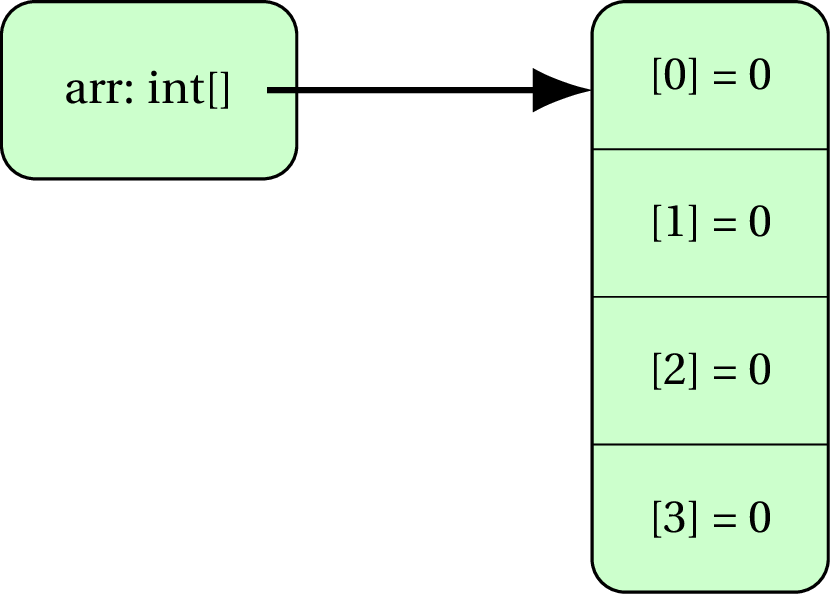
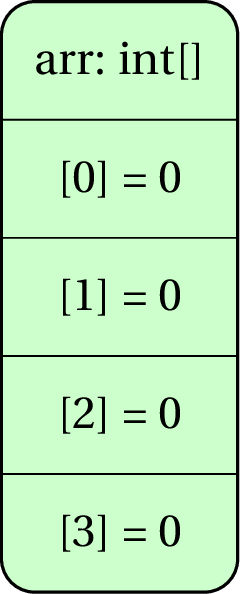
int[] arr = new int[4];
If the first item is at memory address 200-203, the second item will be at 204-207, the third item will be at 208-211 and the last item from 212-215.
The array itself holds the starting address, in this case 200. That’s why we say that an array is a reference.
We represent this as,
or a more simplified way of adding the array label above the items.
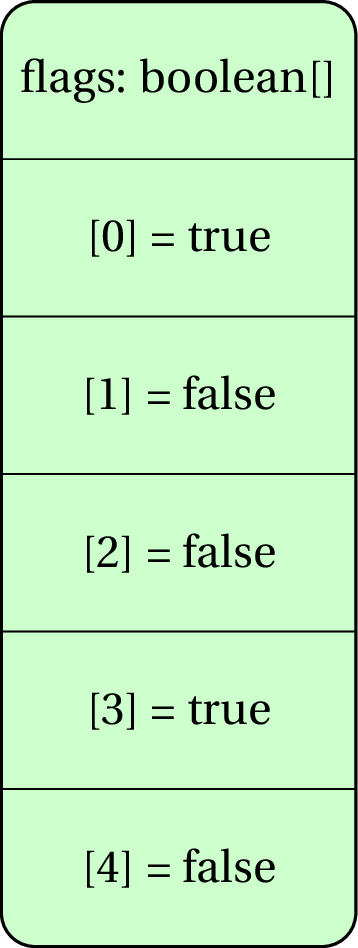
Example
1
boolean[] flags = {true, false, false, true, false};
Reference copy
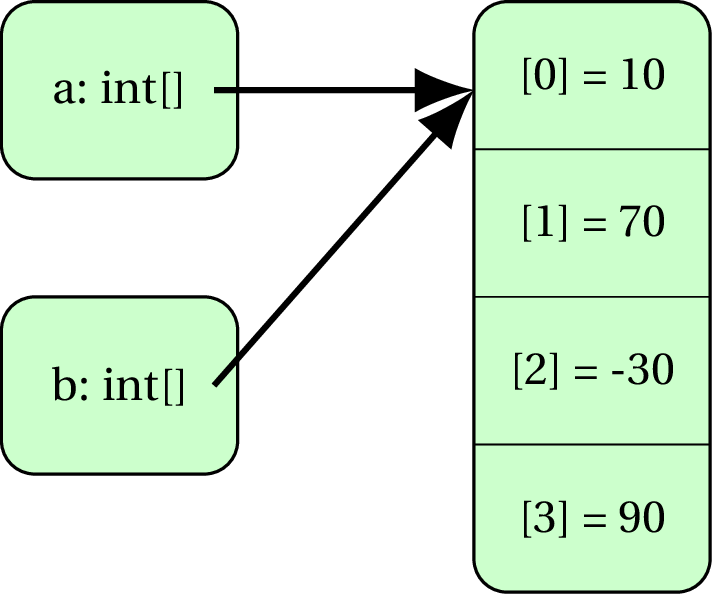
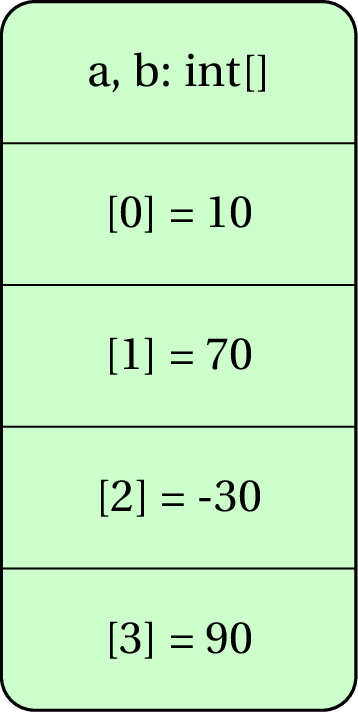
Copying an array (source) into another array (destination) using the = operator makes the destination refer to the same collection of items as the source.
Example
1
2
3
int[] a = {10, 70, 20, 90};
int[] b = a;
b[2] = -30; //a[2] is also -30 now
The outcome is represented by the following memory diagrams,
or the more compact diagram,
Instance copy
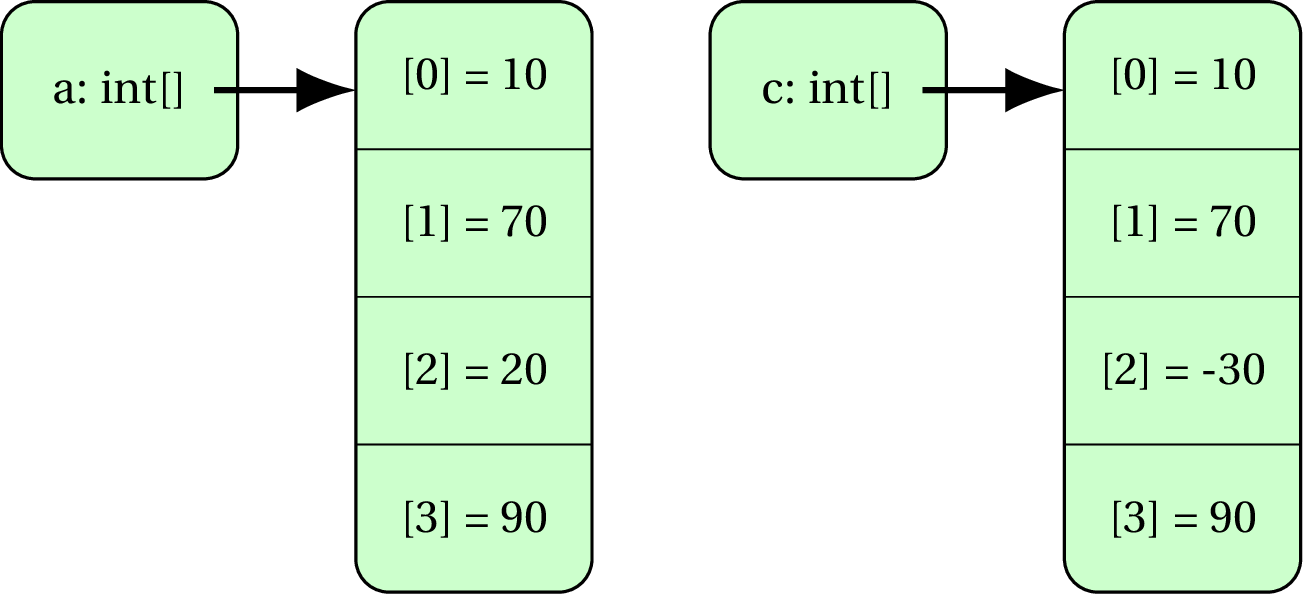
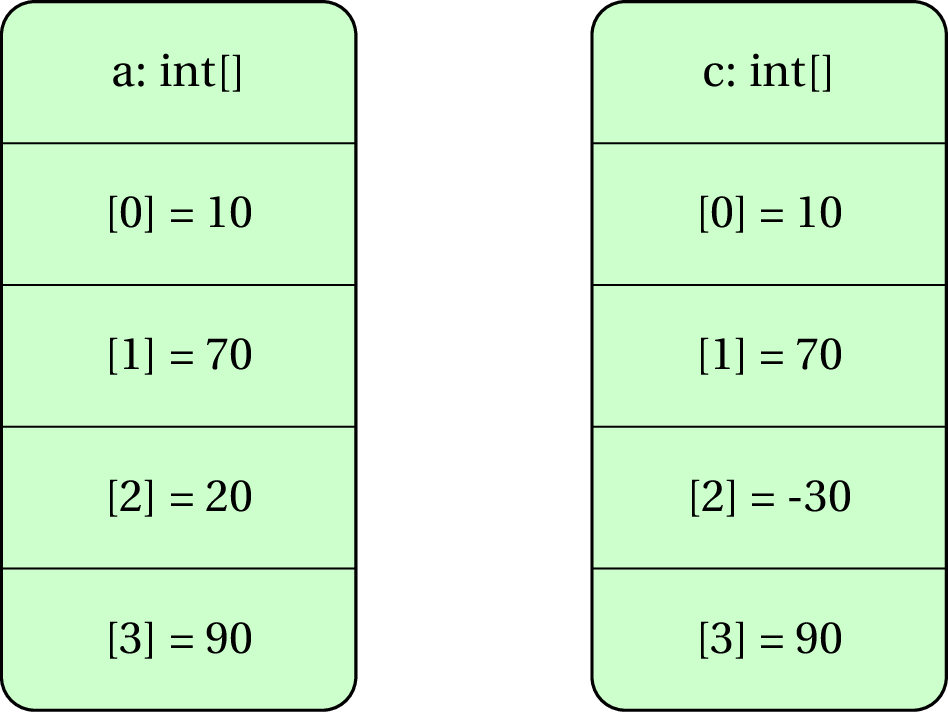
An instance copy is when you create an array of the same size as the source array and then copy each item one by one.
Example
1
2
3
4
5
6
int[] a = {10, 70, 20, 90};
int[] c = new int[a.length];
for(int i=0; i < a.length; i++) {
	c[i] = a[i];
}
c[2] = -30; // a[2] won't change
The outcome is represented by the following memory diagrams,
or the more compact diagram,
Exercises
Exercise 1
Draw the memory diagram for the following code,
1
int[] data = new int[]{50, 90, 30, 20, 60};
Exercise 2
Draw the memory diagram for the following code,
1
2
3
4
5
6
7
8
9
int[] data = new int[6];
for(int i=0; i < data.length; i++) {
	if(i%2 == 0) {
		data[i] = 2*i+1;
	}
	else {
		data[i] = -3*i;
	}
}
Exercise 3
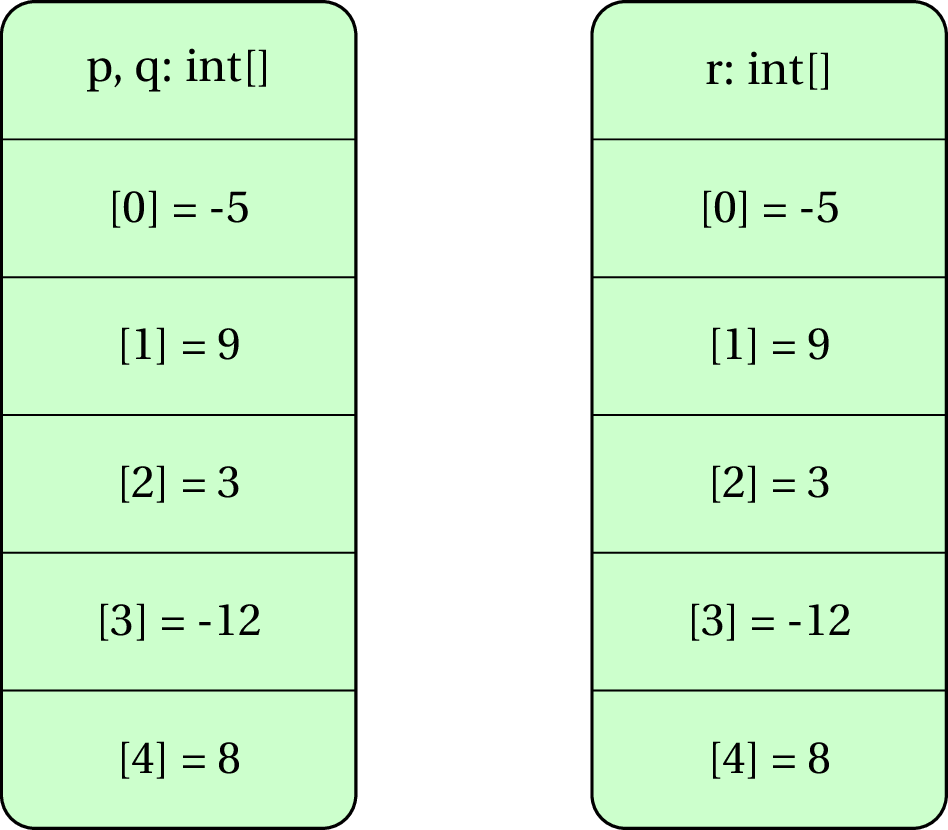
Write a piece of code that creates the arrays represented in the following diagram.
Exercise 4
Draw the memory diagram for the following code,
1
2
3
4
int[] a = {4,8,15,16,23,42};
int[] b = a;
b[2] = 100;
b = new int[]{104,101,108,108,111};
Exercise 5
Write a piece of code that creates an array with 100 integers, each between 1 and 20. Count the number of items that are divisible by the item after them.
For example, if the first few items of the array are {20, 5, 8, 4, 4, ...}, 20 is divisible by 5, 8 is divisible by 4, and 4 is divisible by 4, so we have 3 such items so far.
Exercise 6
Consider the following piece of code.
1
2
3
4
5
int[] items = new int[10];
items[0] = 1;
for(int i=1; i < items.length; i++) {
	items[i] = 2 * items[i-1];
}
What are the contents of the array items?
Coding in the real life
SCENARIO 1
The ages of 20 people is stored in an array ageList. Write a piece of code that determines the range of the distribution. That is, the age difference between the oldest and the youngest person.
SCENARIO 2
The state of 25 electrical switches is held in an array smartSwitches. The states can be “On” (true) or “Off” (false). Write a piece of code that toggles all switches. That is, all switches that are currently “On” should turn “Off”, and all switches that are currently “Off” should turn “On”.
SCENARIO 3
Assume that we are encoding birthdays as integers where 1st january is 1, 2nd january is 2, and so on till 31st december is 366 (remember that 29th february will also be given an integer mapping).
The birthdays of 1000 people is stored in an array bdays. Write a piece of code that displays the most frequent date of birth. For the basic version, you may display an integer between 1 and 366. For the advanced version, display the actual data in DD/MM format.
SCENARIO 4
I keep track of the time taken (in minutes) to run each kilometer over a 100km race (let me dream!). These times are stored in an array lapTimes. For example, if lapTimes[0] is 6.23, it means I ran the first kilometer in 6 minutes 13.8 seconds.
Write a piece of code that determines my fastest lap (for example, display “Kilometer 0-1” if the first kilometer was the fastest, and “Kilometer 63-64” if the 64th kilometer was the fastest.)
SCENARIO 5
For the same scenario of the 100km run, find the fastest stretch of 10 kms (for example, display “Kilometer 13-23” if the stretch starting at 13 kilometers and ending at 23 kilometers was the fastest.)
SCENARIO 6
For the same scenario of the 100km run, find the fastest stretch of N kms where N can be any value between 1 and 100 (inclusive on both sides).
SCENARIO 7 (Advanced)
Implement scenario 6 again, but this time only use a single loop in your solution (If you were already only using one loop, well done!)